
InboxCRM
From £5.99

Turn WhatsApp Web into your sales CRM
Leads, notes, follow-ups and pipelines beside every chat. No Business API, and your CRM data stays on your device.
one-time · lifetime, or start monthly. 24-hour free trial.
On the Chrome Web Store as WhatsApp CRM - InboxCRM
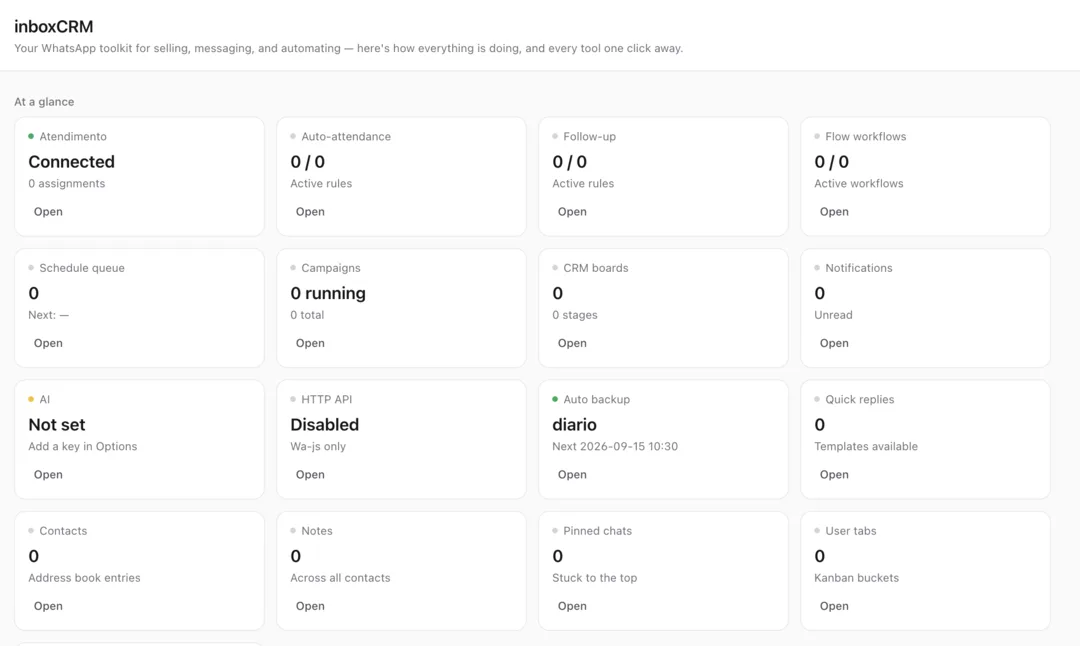
The InboxCRM home screen — every tool and its status, one click away.
Works with
What is InboxCRM?
InboxCRM is a WhatsApp CRM Chrome extension that turns WhatsApp Web into a sales workspace. It adds a sidebar and a chat-tools panel to web.whatsapp.com, so every conversation can sit in a pipeline stage with a deal value, carry notes, tags and custom fields, get a follow-up reminder or scheduled message, and be answered with a saved quick-reply template. It also includes auto-reply rules, a visual chatbot flow builder, an appointment centre, funnel reports, order tracking, webhooks, backup and restore, one-click privacy blur for screen sharing and an optional AI reply assistant that uses your own OpenRouter, OpenAI, Gemini or Groq key. InboxCRM works with the WhatsApp account you already use — no WhatsApp Business API, no number migration — and stores CRM records in Chrome's local storage on your own device. It is built by Extino for small businesses, online stores, real estate agents, clinics, salons, freelancers and agencies that sell on WhatsApp.
InboxCRM key facts
- Product type
- WhatsApp CRM
- Works with
- WhatsApp Web in desktop Chrome
- Setup
- No WhatsApp Business API, no number migration
- Features
- Pipeline, notes, tags, custom fields, follow-ups, scheduled messages, quick replies, auto-replies, chatbot builder, reports, orders, privacy blur
- Data storage
- Chrome local storage on your device
- AI
- Optional, bring your own OpenRouter, OpenAI, Gemini or Groq key
- Price
- Monthly £5.99/month · Yearly £49.99/year · Lifetime £99.99 one-time
- Chrome Web Store
- WhatsApp CRM - InboxCRM
- Page last updated
Sound familiar?
A hot lead from this morning is twenty chats down by lunch, and nobody remembers to reply.
“I'll get back to you Thursday” is easy to promise and easy to forget.
Sizes, budgets and past orders sit in a notes app, a spreadsheet and your memory — and the sheet says “Proposal sent” when the customer already paid.
The problem was never your ideas or your effort. You're doing a machine's job by hand. InboxCRM takes that job off your plate.
How is this different from doing it manually?
| The old way | With InboxCRM |
|---|---|
| Juggle WhatsApp, a spreadsheet and a notes app — and let leads slip between them | Every chat sits in a pipeline stage with a deal value, right inside WhatsApp Web |
| Remember every “I'll get back to you Thursday” in your head | Follow-up reminders and scheduled messages keep every promise on time |
| Type prices, opening hours and delivery times again for every new person | Quick replies, auto-reply rules and a chatbot builder answer the repeat questions |
What do you actually get?
Sales pipeline with deal values beside every chat
Follow-up reminders, scheduled messages & quick replies
No WhatsApp Business API — CRM data stays on your device
A pipeline beside every chat
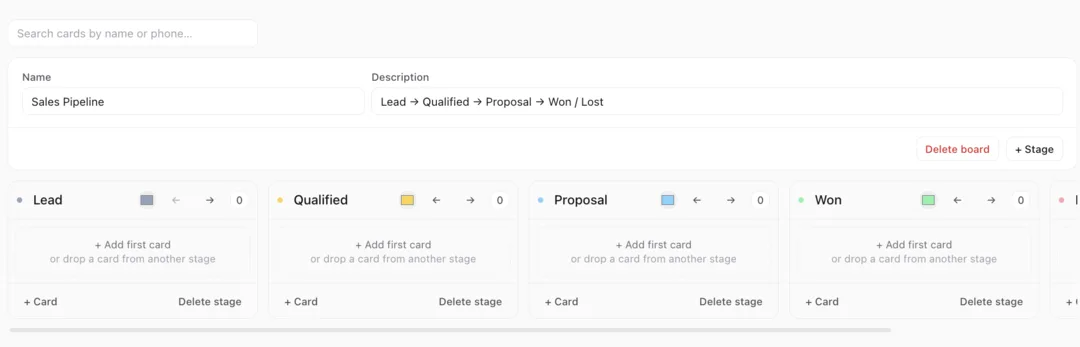
Drop each conversation into a stage — Lead, Qualified, Proposal, Won — with a deal value, on Kanban boards with your own custom stages.
Full customer context
Notes, tags and custom fields sit next to the chat, so sizes, budgets and past orders are there when you reply.
Follow-ups that actually happen
Reminders, follow-up sequences and scheduled messages make sure every promise gets kept on time.
Faster replies
Media-rich quick-reply templates, auto-reply rules and a visual chatbot builder answer the questions you get all day.
Privacy-first by design
CRM records stay in Chrome's local storage on your device, and one-click privacy blur hides customer data when you share your screen.
Bring your own AI
Draft and improve replies with OpenRouter, OpenAI, Gemini or Groq using your own key — optional, and you choose the cost.
Built for small businesses, sales reps, online stores, real estate agents, clinics, salons, freelancers and agencies who sell on WhatsApp.
Up and running in three steps
Add InboxCRM to Chrome
Install the extension in your desktop Chrome browser. No API account and no number migration.
Open WhatsApp Web as usual
The InboxCRM sidebar appears on the left, and a tools panel slides in beside the chat you have open.
Organise as you chat
Drop the chat into a pipeline stage, add a note or tag, set a follow-up and reply with a saved template.
Take a closer look
Which InboxCRM plan is right for you?
Monthly
- ✓Sales pipeline with deal values
- ✓Follow-up reminders & quick replies
- ✓Notes, tags & custom fields
Yearly
- ✓Sales pipeline with deal values
- ✓Follow-up reminders & quick replies
- ✓Notes, tags & custom fields
- ✓Cheaper than 9 months of monthly
Lifetime
Best value
- ✓Sales pipeline with deal values
- ✓Follow-up reminders & quick replies
- ✓Notes, tags & custom fields
- ✓All future updates
- ✓No recurring bill
Everything you get today
Sales pipeline
Kanban boards with custom stages and deal values
Customer context
notes, tags and custom fields beside every chat
Follow-ups & scheduling
reminders, sequences and scheduled messages
Quick replies
media-rich templates and text macros in one click
Automation
auto-reply rules and a visual chatbot builder
Reports & orders
sales funnel, messaging reports and order tracking
Privacy blur
hide customer data when you share your screen
AI reply assistant
optional, with your own API key
or £5.99/month
£99.99
one-time · lifetime, or start monthly. 24-hour free trial.
24-hour free trial, then pick the plan that fits
Try it on your own chats first
Install InboxCRM, run it against your real workload, and judge it on the output. 24-hour free trial, then pick the plan that fits
❌ No forms ❌ No awkward calls
Questions, answered
One quiet click, and the clicking is over.
Add InboxCRM to Chrome24-hour free trial, then pick the plan that fitsIn short: InboxCRM from £5.99 a month, or £99.99 once. The pipeline, notes and reminders sit right beside every WhatsApp chat, so nothing depends on memory. Get it on the Chrome Web Store.