
Google Whisk Shut Down: How to Bulk Generate Images in Google Flow Now
Published · Extino Team
Short answer: Google discontinued Whisk on 30 April 2026 and moved its best features into Google Flow, Google's platform for AI images and video. Anything left in a Whisk library after that date was permanently deleted, but your AI credits carried over, because Whisk and Flow share the same credit system. To make images in bulk now, you can generate them one by one in Flow, ask Flow's built-in Agent for variations, or use a Chrome extension such as Whisk Automation, which was upgraded for Flow and runs saved, reusable workflows: your reference uploaded once, a list of prompts, retries on failures, and delivery to a folder or Telegram.
Last checked against Google's announcements and Flow Help: 30 September 2026.
What happened to Google Whisk?
In March 2026, Google announced on its Workspace Updates blog that "the best capabilities from Whisk are moving directly into Flow". The key facts from that post:
| What | Detail |
|---|---|
| Shutdown date | "April 30, 2026 — Whisk discontinued." |
| Your old images | "Any media remaining in a user's Whisk library after this date will be permanently deleted and will no longer be recoverable." |
| Migration | Users saw an opt-in notice in Whisk with steps to move their content to Flow. |
| Credits | "Because Whisk and Flow use the same AI credits platform, your existing credits are already available in Flow." |
| Unsupported regions | Users there lost access on 30 April "without a migration path". |
Can I still recover my Whisk images?
If you didn't migrate or download them before 30 April 2026, Google says they're gone and can't be recovered. If you did migrate, they're in your Flow library. You can export everything you've made in Flow at any time through Google Takeout (Google Flow Help: "Download your Google Flow data").
Why does my Whisk extension say it's not working?
Any extension built only for Whisk lost its platform on 30 April. Some were upgraded for Flow, and some weren't. Whisk Automation was upgraded for Flow: "Same extension, same install; the platform underneath changed" (Extino's FAQ). If yours still points at the old Whisk page, update it or switch tools.
Where Whisk's features live in Google Flow
Flow now covers most of what Whisk users relied on, plus video:
- Image generation with the Nano Banana models. Google lists Nano Banana Pro, Nano Banana 2, and Nano Banana 2 Lite, "the default model available at no charge".
- References ("ingredients"). Drag images into the prompt box to guide a new image.
- Characters. Google says you can "bundle specific visual and audio references into a single, reusable character", then call it in a prompt by typing @ and its name. This is Flow's own fix for keeping a face the same.
- The Flow Agent. It can brainstorm, edit, and "create multiple variations of an asset at once". It uses your credits, and Google says there's a daily quota on Agent queries.
Two Flow rules matter for bulk work:
- Rate limits. Google may rate-limit generations "particularly for zero-credit models", and after many generations in a day you can make fewer per minute.
- Watermarks. "All outputs generated in Google Flow using Veo, Omni, or Nano Banana include invisible SynthID watermarks." In India, South Korea and Vietnam a visible watermark is added automatically.
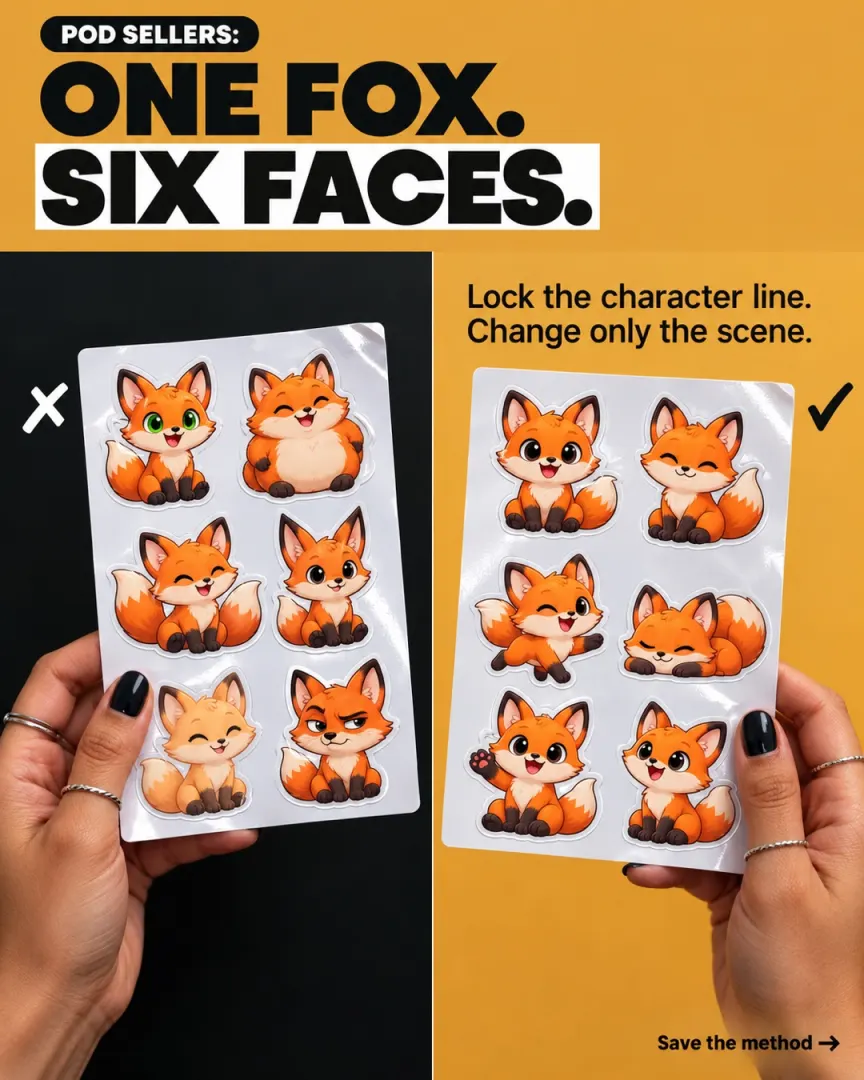
How to keep a character consistent across a set (free)
This is the question most POD and sticker sellers ask after the move. Here's the method that works with or without any extension:
- Make the character once. Use Flow's Characters feature, or pick one clean reference image with a plain background.
- Write one character sentence and never change it. For example: "a round orange fox with a white-tipped tail and big black eyes, flat sticker style, thick white outline". Paste it word for word into every prompt.
- Change only the scene. "…holding a coffee cup", "…on a skateboard", "…asleep on a stack of books".
- Keep the model and aspect ratio fixed for the whole set. Switching models mid-set is a common cause of drift.
- Test four images before you run forty. If the test drifts, fix the sentence first.
No method stops a model drifting completely, and creators on Google's own forum still report characters being re-rendered "into something completely different". Locking the reference and the wording gives it the best chance.
Three ways to generate image sets in bulk on Flow
Option 1: One by one in Flow (free)
Paste a prompt, add your reference, generate, download, and repeat.
- Good for: a handful of images.
- Downsides: every image means re-adding the reference and retyping the prompt structure. For a 40-design drop, that's the same setup forty times, and one failed render means starting that step again.
Option 2: Ask the Flow Agent for variations (free)
Ask the Agent for something like "20 variations of this image with different lighting", which is Google's own example.
- Good for: many takes on one image or idea.
- Downsides: it's chat-based, so it's not built for a list of different prompts. Results save to your Flow project rather than your computer, it uses your credits, and Agent queries have a daily quota.
Option 3: Use Whisk Automation to run a saved workflow
Whisk Automation is a Chrome extension from Extino. It began as a bulk tool for Google Whisk, and when Google shut Whisk down on 30 April 2026 it was upgraded for Flow. Instead of setting up every batch by hand, you connect the steps once as nodes, save the workflow, and re-run it whenever you want.
- Reusable node-based workflows: references, prompts, model settings and delivery, saved as one graph.
- Reference reuse: "Upload a character reference once and reuse it in every run after that."
- Bulk prompts + AI Prompt Rewriter: load a CSV of prompts, and optionally let AI rewrite them before they run. The prompt tool writes image prompts only.
- Retry conditions, so one bad render doesn't cost the batch.
- Delivery to a folder on your computer, or straight to Telegram.
- Good for: POD sellers, sticker and pattern shops, and stock contributors who make sets on a schedule.
- Downsides, honestly: it needs a Google Flow account and uses your own credits and Flow's limits. It runs in Chrome. It can't stop the model drifting, only keep your inputs the same. It's paid: £1.99 a month, £14.99 a year or £29.99 once.
Comparison
| One by one | Flow Agent | Whisk Automation | |
|---|---|---|---|
| Needs a Flow account | Yes | Yes | Yes |
| Uses your Flow credits and limits | Yes | Yes | Yes |
| Best for | A few images | Variations of one idea | Repeat sets from a prompt list |
| Reference kept between batches | Characters: yes · other references: re-add | Per chat | Yes, saved in the workflow |
| Saves the whole setup to re-run | No | No | Yes |
| Retries failed renders | By hand | No | Yes |
| Saves files to your computer | By hand | No, saves to the project | Yes, or sends to Telegram |
| Extra cost | None | None | From £1.99/month |
How to run a batch with Whisk Automation, step by step
- Install Whisk Automation from the Chrome Web Store and pin it to your toolbar.
- Open Google Flow in the same browser, signed in to your own account.
- Open the side panel and start a new workflow, or open a template such as Portrait & Product Studio.
- Add your reference once, in a reference node.
- Add your prompts. Use a single prompt node, or a bulk prompts node with your whole list pasted or loaded from CSV.
- Set the ratio and the number of images in the generate node.
- Choose delivery: a download node for your computer, or a Telegram node.
- Save the workflow, then press run.
- Next time, open the saved workflow and run it again. Your reference is already in it.
Before you sell: label your AI images
Flow's invisible SynthID watermark means your images can be identified as AI-made, whatever tool ran the batch. So label them honestly:
- Adobe Stock asks contributors to tick "Created using generative AI tools" on every AI file, and rejects files that skip it. It also asks you not to put artists' names, real people or fictional characters in your prompts, titles or keywords.
- Other marketplaces have their own AI disclosure rules. Check them before a big upload.
- Keep characters original. Don't prompt for existing brand or film characters in anything you sell.
Is it safe to use an automation extension with Google Flow?
A fair question about any tool. Here's what we can say about Whisk Automation specifically:
- It runs in your own browser, on your own Google account. Every image is made by Flow, with your credits.
- It doesn't need an API key for its main function. If you want prompts generated for you, you can add your own API key, but that's optional.
- Its Chrome Web Store listing discloses that it handles authentication information, personal communications and website content, and that data isn't sold or used for unrelated purposes. Read the privacy section before you install, as you should with any extension.
- Its reviews are public, the good and the bad, and the developer can't edit them.
No tool can promise how Google will treat automated use of its services. Keep batches reasonable, stay within your plan, and read Google's terms. Whisk Automation is an independent tool and isn't affiliated with or endorsed by Google.
Frequently asked questions
Is Google Whisk still available? No. Google discontinued Whisk on 30 April 2026 and moved its best features into Google Flow.
What replaced Google Whisk? Google Flow, Google's platform for AI image and video creation. It uses the same AI credits that Whisk used.
Can I recover my old Whisk images? Only if you migrated or downloaded them before 30 April 2026. Google says media left in a Whisk library after that date was permanently deleted and can't be recovered.
How do I keep the same character in Google Flow? Use Flow's Characters feature or one clean reference image, keep one character sentence word for word in every prompt, change only the scene, and keep the model and aspect ratio fixed.
Does Whisk Automation still work after Whisk shut down? Yes. When Google moved Whisk to Flow, Extino upgraded the extension to run on Flow. The upgrade took about two weeks. It's the same extension and the same install.
Does Whisk Automation make images for free? No. The extension is paid (from £1.99 a month) after a 24-hour free trial, and the images use your own Google Flow credits and limits.
Are images made in Google Flow watermarked? Yes. Google says every output made with Veo, Omni or Nano Banana includes an invisible SynthID watermark, and a visible one is added automatically in India, South Korea and Vietnam.
What's the difference between Whisk Automation and Flow Automation? Both are Extino extensions that run on Google Flow. Whisk Automation leads with reusable node workflows and reference reuse for image sets. Flow Automation leads with video: five generation modes, a model per task, and dated auto-downloads.
Rebuild your batches on Flow. If you make image sets every week, Whisk Automation saves the whole setup once and re-runs it in your own Flow account. Try it free for 24 hours, then it's from £1.99 a month. See Whisk Automation.
Whisk Automation is made by Extino, which builds Chrome extensions for people who create and sell online. Google, Whisk, Google Flow and Nano Banana are trademarks of Google LLC. Adobe Stock is a trademark of Adobe. Extino is not affiliated with Google or Adobe.
Free tools for this
More AI image & video generation guides
- How to Write Hundreds of AI Image Prompts From One Formula
- How to Bulk Generate Veo Videos in Google Flow
- How to Bulk Generate Designs in Ideogram From a Spreadsheet
- How to Bulk Generate Images and Videos With Meta AI
- How to Run Hundreds of Midjourney Prompts in Bulk
- How to Run Multiple Prompts in ChatGPT Automatically (Without the API)